
Real vehicle, transmission and document data. Search the current fleet for the registration number first.
Follow these steps
Open the fleet
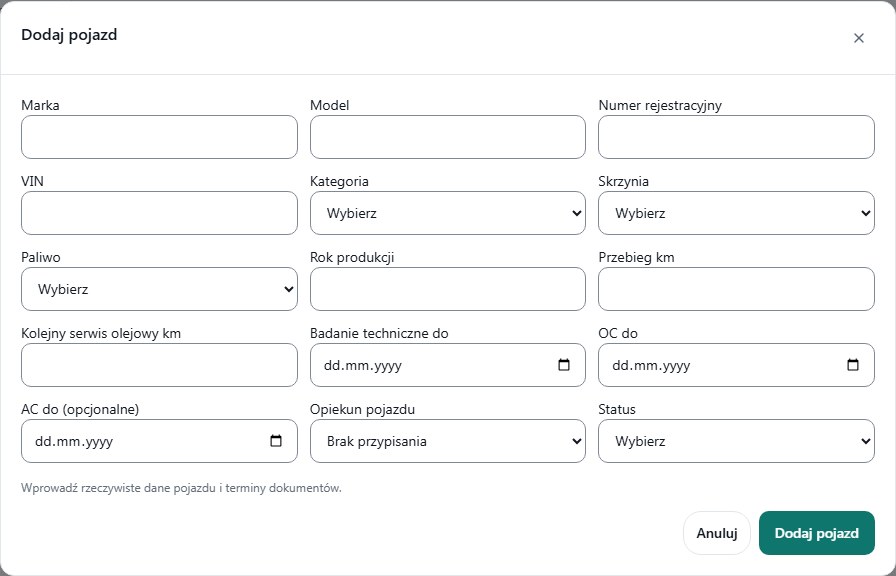
Choose Vehicles, then Add vehicle. Do not use the service-ticket form to add a car.
Enter vehicle data
Fill in make, model, registration number, category and transmission. Manual and automatic are different variants relevant to student assignment.
Verify dates and parameters
Enter the real mileage, production year, inspection and insurance dates and other required fields. AC insurance has a separate optional field.
Set status and save
Choose Active only for a vehicle cleared for work. Submit Add vehicle and verify registration, category, transmission and status in the row.
Check warnings before scheduling
Review Technical inspection and insurance and Service issues. A vehicle custodian does not mean the car is assigned to every lesson of that instructor.
What to enter and what it means
- Category / transmission
- Select the correct category and Manual or Automatic.
- Inspection valid to / insurance valid to
- Dates copied from documents, not example future dates.
- Status
- Active or Disabled. Disabling a vehicle does not automatically reschedule existing lessons.
- Vehicle custodian
- Optional responsibility assignment; it is not a vehicle reservation.
How to verify it worked
The vehicle has correct data and a visible status. When creating a lesson it still has to be selected in Vehicle.
Active status alone does not guarantee there is no time conflict with another lesson.
If the vehicle breaks down, review already scheduled lessons. Do not assume a status change moved them to another vehicle.